Advertiser Account
Designed the unified permissions experience that helps admins manage Sponsored Ads and Amazon DSP access through one advertiser account.
The advertiser account simplifies how advertisers activate Amazon Ads products and manage access globally. This case study highlights my work as the permissions UX owner, where I defined the unified roles model and designed the end to end admin experience for inviting users and managing access.
Project overview and role
I owned the end to end permissions experience for the advertiser account, defining how administrators invite users, assign roles, and manage access over time within one account structure. The work shipped in three phased milestones from Q1 to Q3 to reduce risk, validate the model, and scale it safely.
Context
Advertisers often run Sponsored Ads and Amazon DSP side by side, but historically these products lived in separate account ecosystems. Amazon Ads introduced the advertiser account to simplify registration and activation globally, centralize user management, and reduce account switching. In the initial launch, the advertiser account was available for new account creation only, with an upgrade path for existing accounts planned later. That made permissions uniquely challenging: we needed a model that could unify two legacy systems now, while staying extensible for future upgrades.
What I did
- Audited legacy Sponsored Ads and DSP invite and access flows and mapped mismatches in role meaning and system behavior.
- Defined a unified roles and permissions foundation (admin, editor, viewer plus custom app level access) that stays predictable across products.
- Designed scalable admin workflows (user invites, clearer app scope, and stronger user management patterns) aligned with existing data table utilities.
- Aligned teams and stakeholders across three orgs and pushed back on late scope that would have increased ambiguity for customers.
Project pillars
The advertiser account shipped across three connected pillars. This write up focuses on permissions, with a quick view into how billing and campaign creation aligned to the same account foundation.
Establish the advertiser account and unify how admins invite users and manage access across Sponsored Ads and Amazon DSP, using standardized roles and a single experience that scales for agencies and enterprise teams.
-
1
Create a new advertiser account
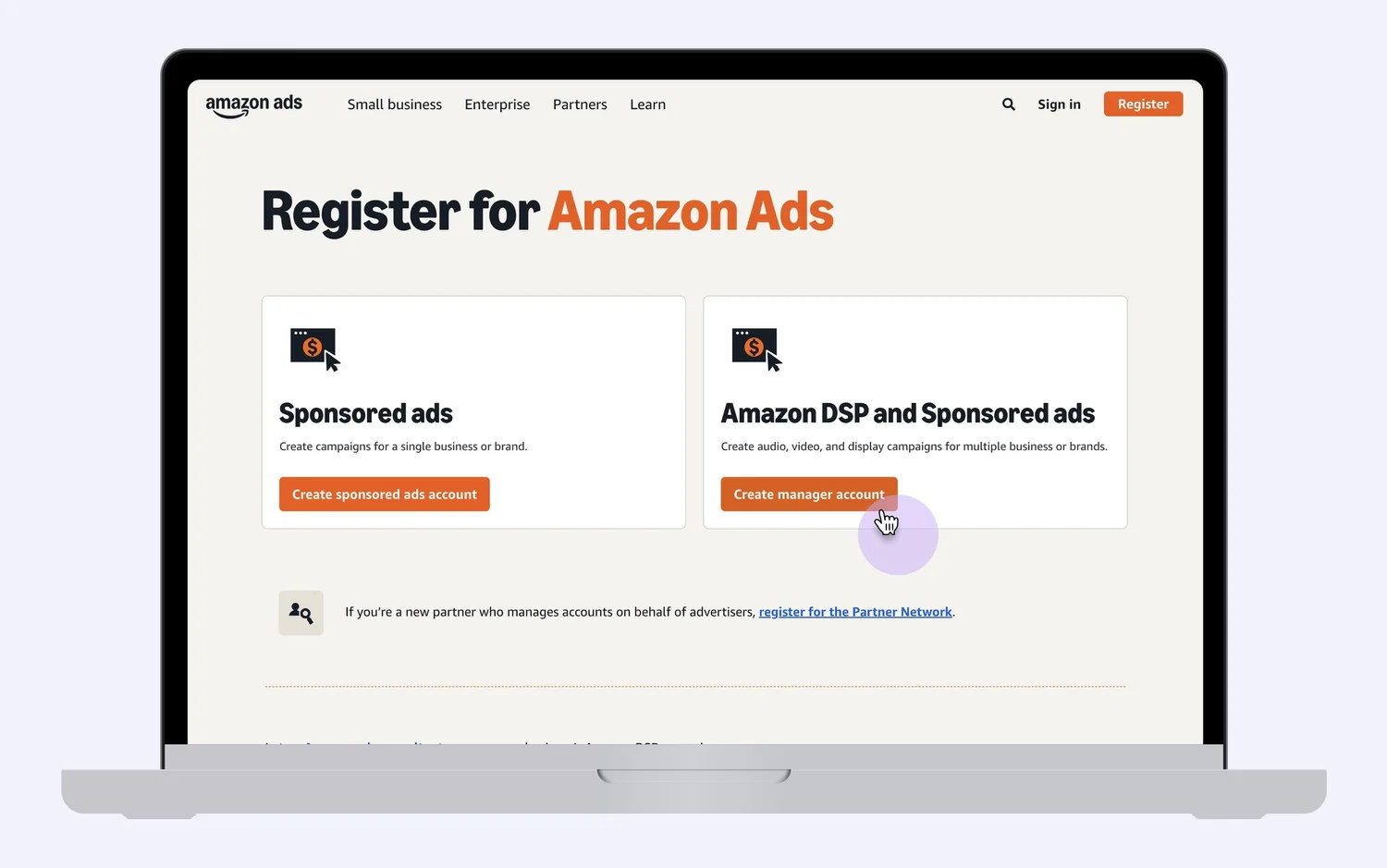
Advertisers start by creating a new advertiser account that becomes the shared foundation for Sponsored Ads and Amazon DSP.
-
2
Invite users with clarity
Admins add teammates or partners through a guided invite flow that makes access outcomes easy to understand.
-
3
Standardize roles across products
Admin, editor, and viewer map to predictable access outcomes, with custom access when teams need more control.
-
4
Manage access over time
Admins can review users, track invitations, and update permissions as organizations evolve.
Align billing under the advertiser account so billing relationships support the unified structure without breaking existing setups.
- 1
Unify billing structure
Support billing setup aligned to the advertiser account model.
- 2
Preserve continuity
Minimize disruption to existing payment and invoicing workflows.
Ensure campaign creation flows work smoothly under the advertiser account, with the right account context applied during setup.
- 1
Preserve creation speed
Keep setup efficient while transitioning to the new structure.
- 2
Apply account context
Ensure permissions and account scope are respected during creation.
The permissions problem
Sponsored Ads and Amazon DSP were built as separate account ecosystems, with roles that shared names but did not always map to the same capabilities. That inconsistency made delegation risky: admins had to interpret role meaning differently across products and often needed follow ups to confirm what access a user would actually receive.
What made permissions hard
- Fragmented entry points for inviting users and managing access.
- Mismatched role meaning, where the same label did not always grant the same access.
- Admin dependency created bottlenecks for invitations and role updates.
- Limited visibility into who has access and where permissions apply.
- Operational friction at scale for agencies managing many users across accounts.
-
Viewer: available in Sponsored Ads, but not offered in DSP.
-
Editor: could view billing in DSP, but billing access was restricted to admins in Sponsored Ads.
-
Editor: did not have reporting access in DSP, while Sponsored Ads editors could access reporting.
-
Custom: DSP custom roles did not include a view-only option for custom applications, while view was available in Sponsored Ads.
What “Custom” means: admins can mix admin, edit, and view access per application (for example, admin for reporting and campaign manager, view-only for billing).

Goals and hypotheses
To directly address the role inconsistencies described above, this phase focused on new advertiser accounts first. The goal was to make role meaning predictable across Sponsored Ads and Amazon DSP, reduce admin bottlenecks, and create a foundation that can support future upgrades for existing accounts.
Design goals
Reduce admin overhead
Enable one place to invite users and assign access, so teams onboard faster with fewer handoffs.
Signal of success: faster onboarding, fewer stalled invitations, fewer admin bottlenecks.
Make delegation predictable
Standardize role meaning so admins understand what each option grants across products.
Signal of success: fewer incorrect assignments, less rework, fewer escalations.
Scale for agencies and large teams
Support scale behaviors like bulk invites, searchable user lists, and clearer invitation status.
Signal of success: admins can manage access changes without relying on a small set of power users.
Hypotheses
Hypothesis 1
If roles are standardized and mapped to clear outcomes across Sponsored Ads and Amazon DSP inside the advertiser account, admins will delegate with more confidence, resulting in fewer incorrect assignments and less rework.
Hypothesis 2
If invite and management workflows support scale (bulk invites, search, filters, and invitation tracking), agencies and large advertisers will onboard faster and rely less on a small set of admins.
Hypothesis 3
If we launch as a new account experience without changing existing Sponsored Ads and Amazon DSP accounts, we can ship with lower risk, validate adoption, and build a foundation for a future upgrade path.
Before to after
Role names existed, but meaning was inconsistent
Teams navigated separate account experiences and interpreted different permissions systems. Admin only actions created bottlenecks, and role labels did not consistently map to the same access across products.
Unified roles with one permissions home
A unified permissions experience supports standardized roles, clearer access outcomes, and scalable user management for new advertiser accounts, while leaving existing Sponsored Ads and Amazon DSP accounts unchanged in this phase.
A consolidated permissions experience
Milestone 1 focused on aligning DSP permissions to match the Sponsored Ads role model, so role names and outcomes were consistent. This included adding Viewer to DSP and introducing view-only options in Custom. Sequencing the work this way helped DSP-first customers learn the updated role semantics before creating a new advertiser account in the next phase.
What the experience makes clear in product
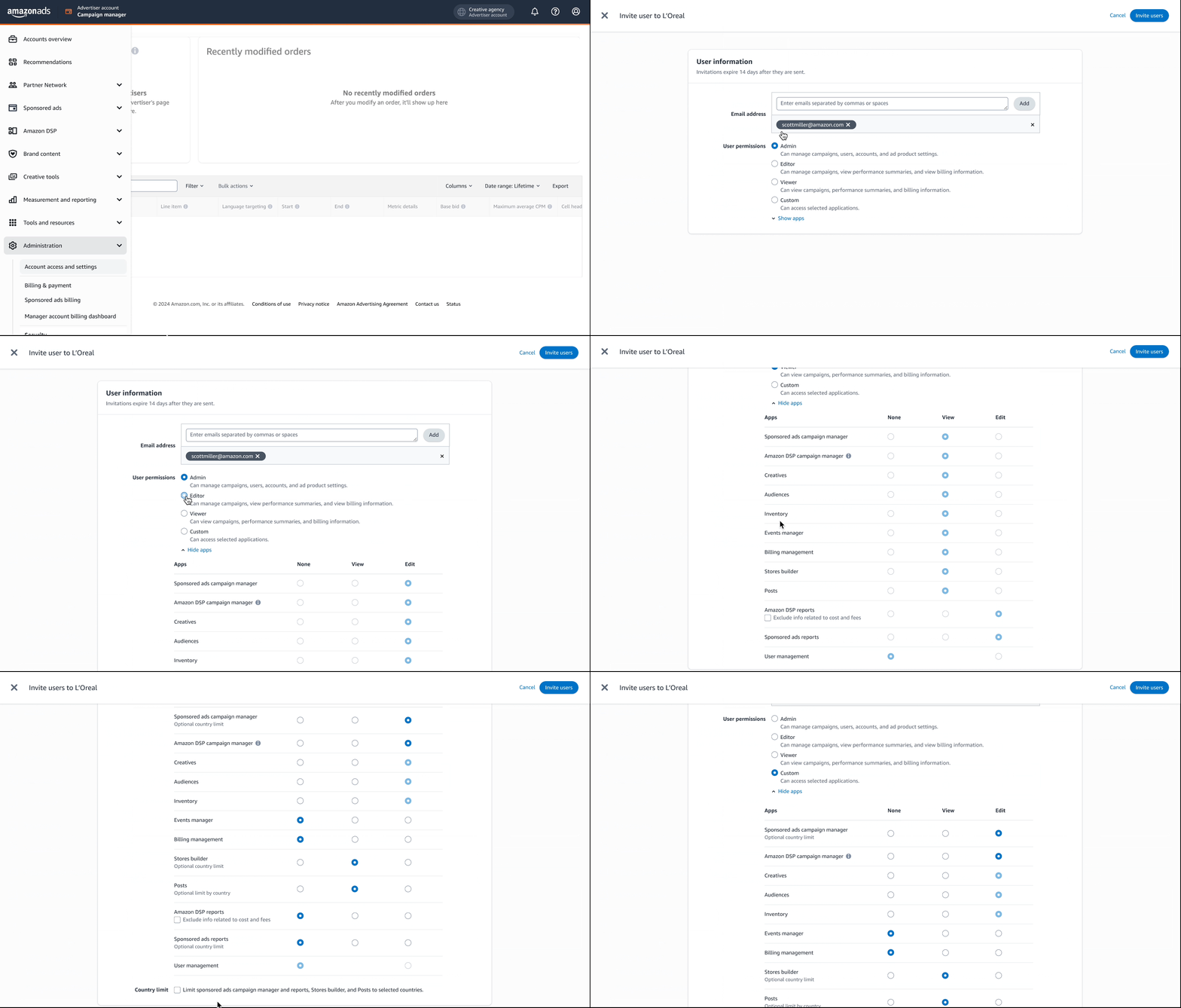
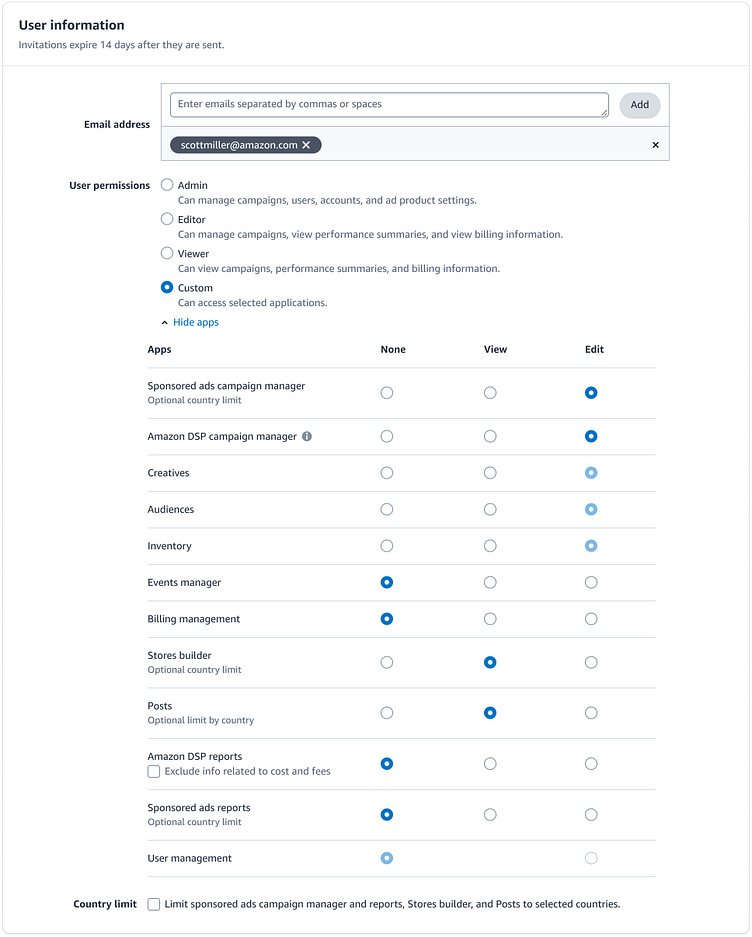
- Invite users in one place, including multiple email addresses for agencies and large teams.
- Standard roles map to predictable access outcomes across Sponsored Ads and DSP.
- Custom roles enable app level access when predefined roles are too broad, including view-only control where needed.
- Unified app visibility so admins understand what is included and where permissions apply.
- Country based limits remain available for select Sponsored Ads apps.
Key challenge: unifying two permission ecosystems into one model while keeping admin actions predictable and scalable.
Invitation page UI anatomy
The unified invitation flow helps admins add users, assign predictable access, and fine tune app permissions in one place. The anatomy below highlights the parts that reduce ambiguity while keeping flexibility where it still matters.
 1
2
3
4
5
1
2
3
4
5
User administration improvements
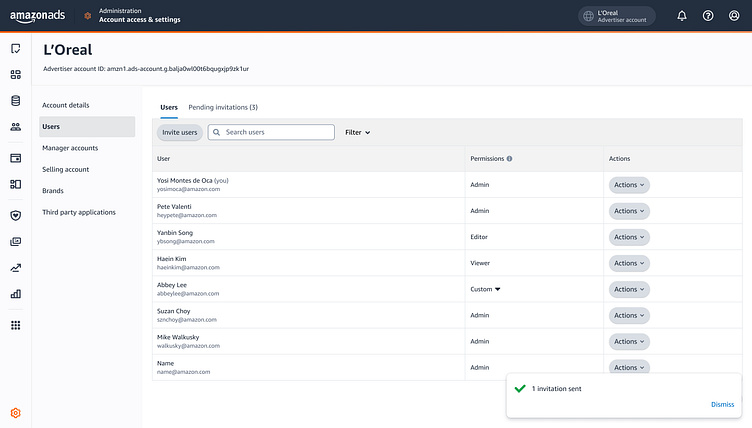
After invitations shipped, the next gap was ongoing user management. Admins needed faster ways to find users, filter by permission type, and track invitations that were still pending. This milestone brings familiar table utilities into user management so teams can manage access at scale.
Search and filters for faster management
I added patterns already used in other high scale tables, so admins can locate users quickly and update permissions with less manual scanning.
- Search to find users by name or email.
- Filters to narrow results by permission type.
- More consistent table behavior across user management surfaces.
Dedicated view for pending invitations
I added a separate tab for pending invitations so admins can monitor invites that have not been accepted and follow up when onboarding stalls.
- Pending invitations stay visible without cluttering the active users list.
- Invited on helps identify stale invites and take action.
- Clearer operational workflow for agencies inviting many users.

Delivery timeline across milestones
The permissions work spanned three quarters in 2025. Because we were unifying permissions across Sponsored Ads and Amazon DSP, delivery was intentionally phased to reduce risk, preserve critical behaviors, and validate each step before scaling. In parallel, I helped onboard and mentor new designers to expand capacity across related initiatives, including billing.
Outcomes and impact
Across three milestones, the advertiser account permissions experience moved access management into one predictable place and introduced the operational patterns needed to scale.
A clearer permissions home
Standardized roles and a consolidated invite flow help admins understand access outcomes across Sponsored Ads and Amazon DSP.
- One place to invite users and assign access.
- Less ambiguity when delegating across products.
- Clearer visibility into where permissions apply.
More scalable administration
Familiar table utilities reduce manual scanning and support agencies and large teams managing frequent access changes.
- Search and filters speed up user management.
- Pending invitations stay visible and actionable.
- Consistent behavior across high-scale tables.
What advertisers said
Early feedback highlighted stronger clarity during invites, more confidence in role selection, and faster day-to-day administration.
Publicis (Agency)
The user permissions or access roles are finally consistent across Sponsored ads and Amazon DSP. I don’t have to guess anymore what permissions someone will get depending on the product. This is amazing!!
Enterprise advertiser
Having a single account to manage both products makes campaign creation more efficient. I no longer need to switch between accounts or invite users twice—one invitation grants access to both Sponsored Ads and Amazon DSP.
L'Oréal
When you’re managing accounts (sponsored ads, Amazon DSP, Manager Accounts) across multiple countries, user management gets really complex. Search, filters, and visibility into pending invitations save a lot of time, time we can utilize in the campaign creation.
What’s next
With the core permissions foundation shipped, the focus in 2026 shifts from new advertiser accounts to enabling existing Sponsored Ads and Amazon DSP advertisers to upgrade into a single advertiser account. This next phase introduces new complexity: many advertisers already operate multiple accounts across products, and upgrades must carefully preserve existing setups while reducing long-term fragmentation.
2026 focus areas
Based on rollout learnings and advertiser feedback, the next phase prioritizes:
- Upgrade paths for existing accounts, allowing legacy Sponsored Ads and DSP advertisers to transition without rework or loss of access.
- Stronger partner and agency workflows, with clearer delegation models and safer access changes across many linked accounts.
- Governance and visibility improvements, including clearer auditing and better signals for stale or risky access at scale.
- Continued parity across Sponsored Ads and Amazon DSP experiences, ensuring role meaning stays consistent as new capabilities ship.