Promotions page - Amazon ads
Design the Promotions experience used by 80K+ advertisers weekly across 14+ countries
Advertisers often missed available promos or felt unsure about eligibility, expiration, and how credits would apply to charges. The Promotions page consolidates offers into a single destination within the Billing Center, helping advertisers quickly understand what’s available, what’s active, and what actions to take.
Project overview
I designed the Promotions page experience to make Amazon Ads promotional credits easier to understand and use. Advertisers often didn’t know they had an offer available, what they needed to do to qualify, when credits would show up, or how credits would apply to future charges. This experience consolidates promotions into a single destination in the Billing Center, clearly explaining participation paths (invitation or promo code), surfacing key terms like eligibility and expiration, and guiding advertisers through redemption and next steps so they can confidently track progress and use credits as intended.
About the product
Sponsored Ads are Amazon’s self-service advertising products that help brands promote their listings and drive discovery while customers shop on Amazon. They include campaign types like Sponsored Products, Sponsored Brands, and Sponsored Display, and are typically billed based on performance (for example, cost-per-click). Amazon Ads may offer promotional campaigns for Sponsored Ads that award ad credits to eligible advertisers. Promotions can be accessed by invitation or by entering a promo code, and each offer includes specific qualifying actions, timeframes, and terms such as eligibility requirements and expiration. The Promotions page in the Billing Center is where advertisers can discover available offers, apply promo codes, understand when credits will be applied, and monitor credits as they’re used toward future Sponsored Ads charges based on the promotion’s rules.
How Promotions work in Sponsored ads
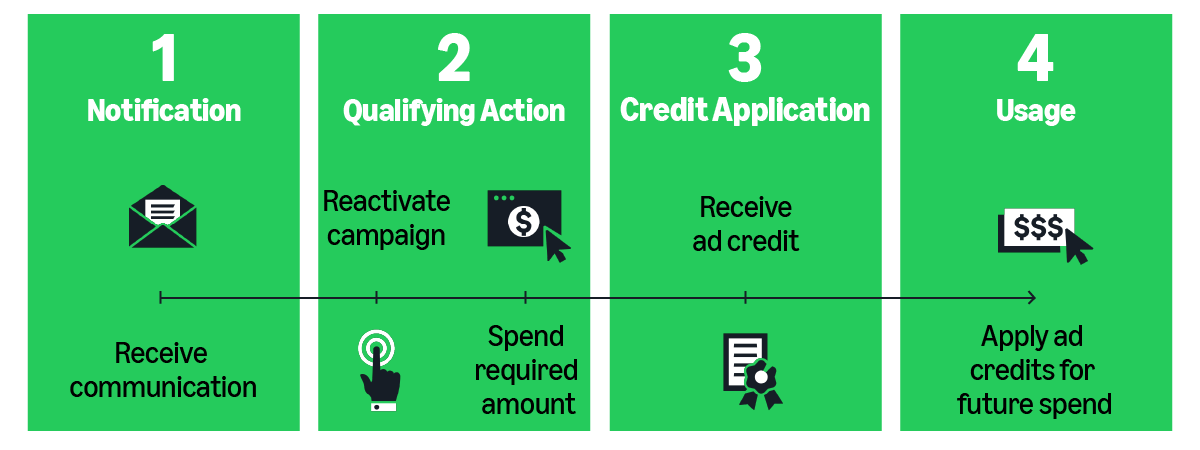
Amazon Ads promotions award ad credits for Sponsored Ads. Advertisers can participate by invitation or by entering a promo code, then complete qualifying actions. Credits are applied automatically and used toward future advertising charges before they expire.
Promo-code promotions require manual activation. Advertisers receive a code (from Amazon, an affiliate, or a creator), add it in the Promotions dashboard, then complete the offer requirements to earn ad credits.
-
1
Get a promo code
Amazon runs promotions that require a code to activate. Codes may come from Amazon, an affiliate partner, or a social media creator.
-
2
Enter the code
In the Promotions dashboard, open the Promo codes section, paste the code, and click Add.
-
3
Activate and review terms
After adding the code, the offer becomes active. Advertisers review eligibility, qualifying actions, and the expiration window.
-
4
Complete qualifying actions
Advertisers meet the promotion requirements, which may include spending a required amount within a defined time frame.
-
5
Credits are applied and used
Once requirements are met, ad credits are applied automatically and used toward future eligible Sponsored Ads charges until exhausted or expired.
Invitation-based promotions are largely automatic and follow a simple flow: notification of an available offer, a qualifying action (often tied to spend within a time window), automatic credit application, and usage toward future Sponsored Ads spend before expiration.
The problem
Promotions were growing from a one-off “by invitation” experience into a scalable, in-console strategy, especially with the shift to
Spend X, Get Y to drive acquisition and reactivation. But the existing experience wasn’t built for self-serve.
Advertisers had no single place to activate, validate, and track promotions end to end.
The gap was most painful for promo codes. Codes from affiliates, creators, or Amazon often required a
manual support workflow to activate, with limited confirmation and unclear next steps. As a result, advertisers hesitated:
they couldn’t confidently tell if they were eligible, what actions qualified, or when credits would actually apply to billing.
My focus was to bring promo-code activation into the product and make the journey predictable by clarifying requirements
up front and making progress explicit from code added to credits applied.
Where advertisers struggled
- Activation feedback was inconsistent, making it hard to know whether a code was valid or successfully applied.
- Eligibility rules and qualifying actions were fragmented, so advertisers missed requirements or completed the wrong steps.
- There was limited visibility into timing, progress, and when credits would appear or be applied to charges.
- Error states and support outcomes didn’t reliably explain what happened or how to resolve issues.
Why this mattered
- Promotions influence real spend decisions, so lack of confidence directly reduced activation and delayed campaigns.
- Support-dependent activation created avoidable friction and slowed a strategy designed to scale across markets.
Goals and hypotheses
To support a scalable Spend X, Get Y strategy, the Promotions experience needed to move from a support-led activation model to a self-serve system that helps advertisers activate, qualify, and trust promotional credits directly in the product.
Design goals
Enable self-serve activation
Allow advertisers to redeem promo codes directly in the UI without contacting support or waiting for manual review.
Signal of success: faster activation and reduced support dependency.
Clarify eligibility and requirements
Surface qualifying actions, terms, and campaign requirements upfront so expectations are clear before advertisers commit spend.
Signal of success: fewer failed or abandoned activation attempts.
Make outcomes predictable
Clearly communicate progress, timing, and redemption so credits feel trustworthy and understandable over time.
Signal of success: higher confidence and continued engagement.
Hypotheses
Hypothesis 1
If advertisers receive immediate confirmation and clear eligibility guidance after adding a promo code, they will activate promotions faster and with less hesitation.
Hypothesis 2
If promotion offers clearly explain requirements and progress, advertisers will complete qualifying actions more reliably and engage with both new and existing offers.
Before → After
Support-led promo activation
Promo codes could not be activated in the product. Advertisers who received a code from Amazon, an affiliate, or a creator had to contact support, submit a ticket, and wait for manual validation. The process was opaque, disconnected from campaign setup, and created uncertainty around eligibility and timing.
Self-serve activation with clear outcomes
Promo code activation is now embedded directly in the Promotions page. Advertisers receive immediate confirmation, see eligibility requirements upfront, and can track progress from activation through credit application. The experience removes support dependency and makes promotional value predictable.
A new consolidated promotions experience
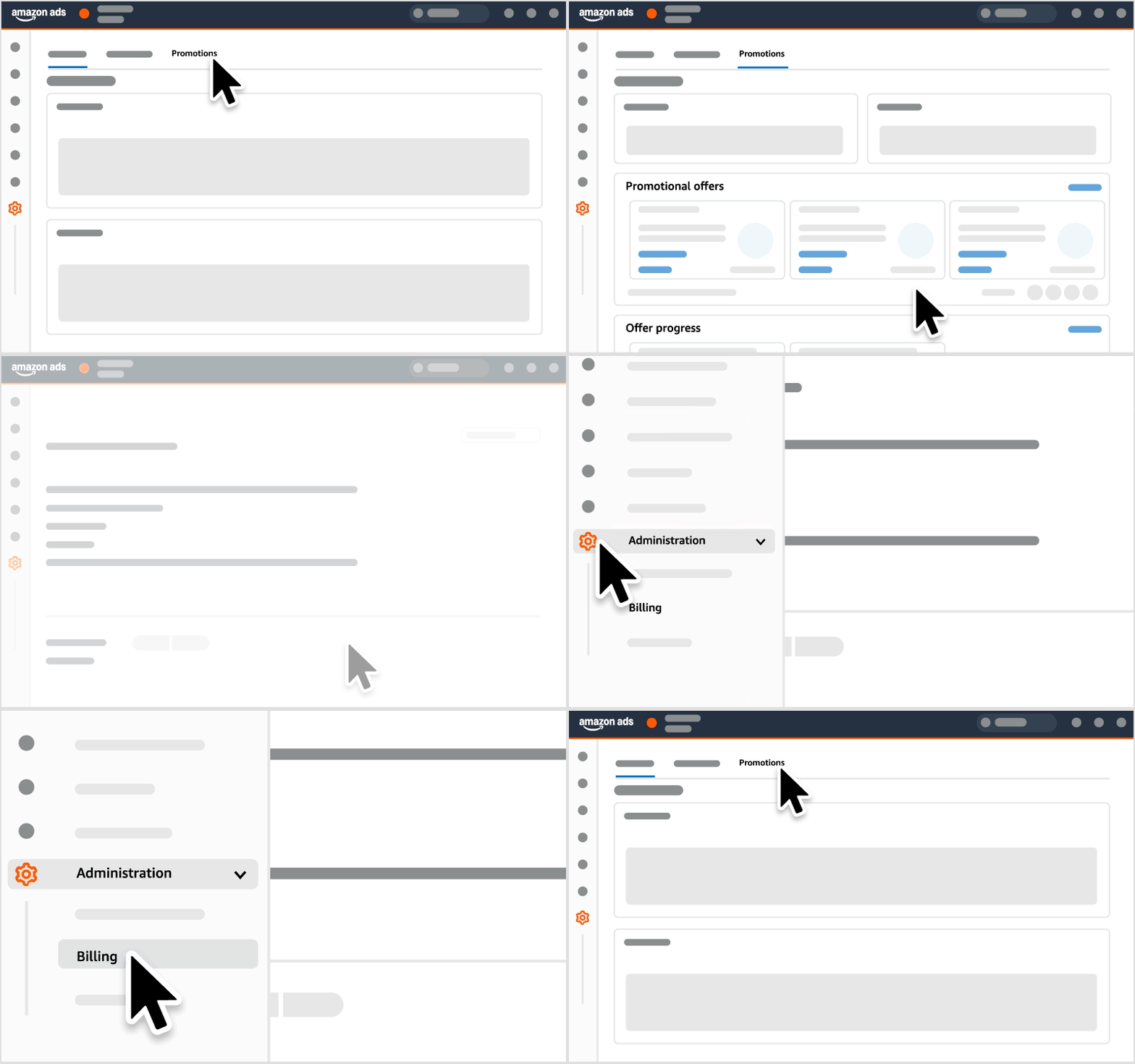
The Promotions page acts as a centralized place where advertisers can view available offers, track active promotions, and understand how credits apply to their campaigns. Advertisers can see eligibility requirements, promotion status, and qualifying actions in one view, and navigate from account-level offers to campaign-level details to understand where credits will apply and what steps remain.
What the page makes clear in-product
- Eligibility and requirements are surfaced upfront so advertisers understand what qualifies before committing spend.
- Clear promotion status helps advertisers distinguish what is available, active, pending, or completed.
- Progress and timing explain the path from code added to credits applied, including when changes take effect.
- Campaign visibility shows where credits will apply and what actions to take to start or continue earning.
Reference: official help guidance on promotions and campaign visibility. View help article
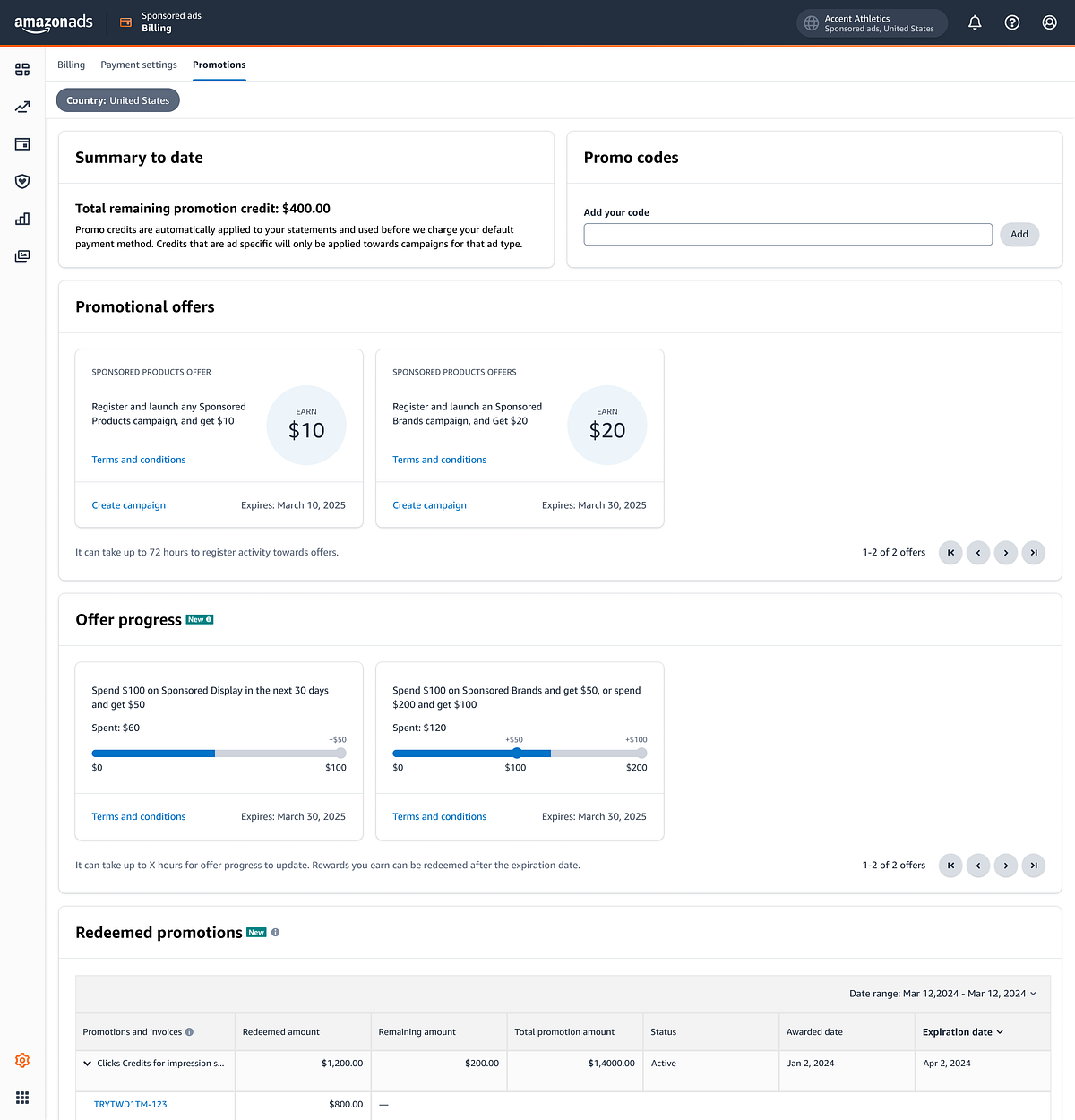
Solution and UI anatomy
To make promotions truly self-serve, the page is organized around the three most common advertiser intents: activate (promo code or offer), understand what qualifies, and track outcomes. The anatomy below shows how each section reduces ambiguity and supports confident spend decisions.
 1
2
3
4
5
6
1
2
3
4
5
6
Design decisions and tradeoffs
As the Promotions experience evolved, multiple interaction patterns were explored across discovery, activation, and tracking. The decisions below capture the alternatives considered, why they were rejected, and the final approaches chosen to support clarity, scalability, and advertiser confidence.
Results and impact
The final experience launched alongside the new Spend X, Get Y strategy, transforming promotions from a manual, support-driven process into a self-serve, in-console workflow. The redesign enabled advertisers to activate, understand, and track promotions with confidence—while providing a scalable foundation for future promotion models.
80K+
Page visits per week
14
Countries supported
23M
Offers generated
22.2K
Active advertisers
11K
Qualified for rewards
Live
In console today
What shipped
A unified Promotions page supporting both legacy and SXGY offers, with clear activation paths, eligibility signals, and progress tracking built directly into the Ads console.
Design leadership
Expanded the scope beyond a single widget, aligned cross-team input, and made tradeoffs that protected scanability, clarity, and long-term scalability under shifting requirements.
Why it mattered
Reduced ambiguity around promo codes, lowered reliance on support, and enabled advertisers to act confidently—supporting both short-term activation and long-term retention goals.
Rollout
Phased over three weeks to support scale and stability.
Jul 29
Spend X, Get Y promotions launched in console.
Aug 18
Phased rollout began across advertiser segments.
Sep 22
Rollout completed across supported marketplaces.